

A lot of 3PL warehouses still run key parts of the day through email, spreadsheets, and customer portals. That makes sense at first, because those tools are familiar, cheap, and easy to patch together when you’re growing fast. But as order volume rises, those workarounds start to slow things down, create keying mistakes, and make it harder to meet client expectations.
That’s where EDI comes in. Electronic Data Interchange lets order, inventory, and shipment data move between systems in a standard format, so your team doesn’t have to retype the same details over and over. As a result, orders flow faster, updates stay cleaner, and trading partners get the information they need on time.
If you’re a warehouse operator, founder, or ops manager who’s new to EDI, this guide is built for you. It will break down what EDI actually does, what documents matter first, and how 3PLs can start without turning the warehouse upside down.
Most importantly, getting started doesn’t have to mean a huge system overhaul. With the right setup, including EDI integration with WMS, you can take a low-risk first step and build from there.
What EDI is, and what it actually does inside a 3PL operation
At a basic level, EDI helps your warehouse and your customer’s system talk without human retyping. Instead of reading an email, copying order details, and keying them into your WMS, the data arrives in a set format your software can read on its own. That saves time, cuts mistakes, and keeps orders moving.
Think of EDI as a shared digital language between your warehouse and your customers
Think of EDI like a standard shipping label that every scanner can read. If each customer sent order info in a different layout, your team would have to stop and translate it every time. EDI fixes that by putting data into a structured format, so systems can read it automatically.
That’s the key point: EDI is not just sending files back and forth. It sends data in a predictable pattern, so your software knows which field is the PO number, which line is the SKU, and where the ship-to address belongs.
In plain terms, a trading partner is the customer, retailer, or vendor you exchange EDI with. A document type is the kind of message being sent. A mapping tells one system how to match its fields to another. Delivery may happen through a VAN (a managed EDI mailbox) or an API, which sends data directly between systems.
The most common EDI documents beginners should know first
For a new 3PL, a few documents do most of the work:
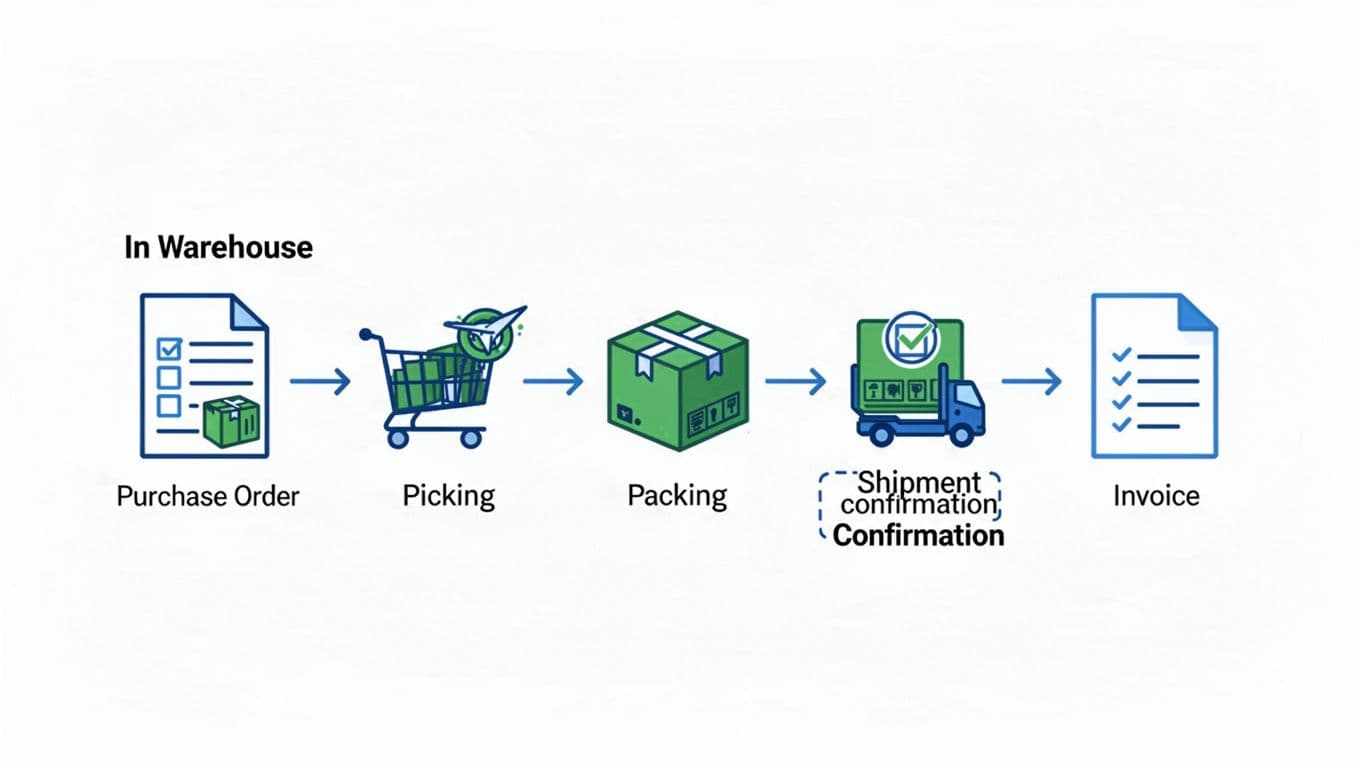
- Purchase order: Tells you what the customer wants shipped or received.
- Warehouse shipping order: Sends outbound order details into the warehouse.
- Inventory report: Shares current stock counts back to the customer.
- Shipment notice: Confirms what shipped, when it shipped, and often includes tracking.
- Invoice: Sends charges for storage, picking, packing, or freight.
In daily use, this creates a simple flow: order comes in, your team picks and ships it, then status and billing go back out.
Where EDI fits between your WMS, customers, carriers, and accounting tools
EDI usually sits in the middle of a larger workflow, not off to the side. Customer data comes in through EDI, then feeds your WMS. From there, the WMS drives picking, packing, and shipment steps. After that, shipping details can pass to carriers, and billing data can move into accounting.
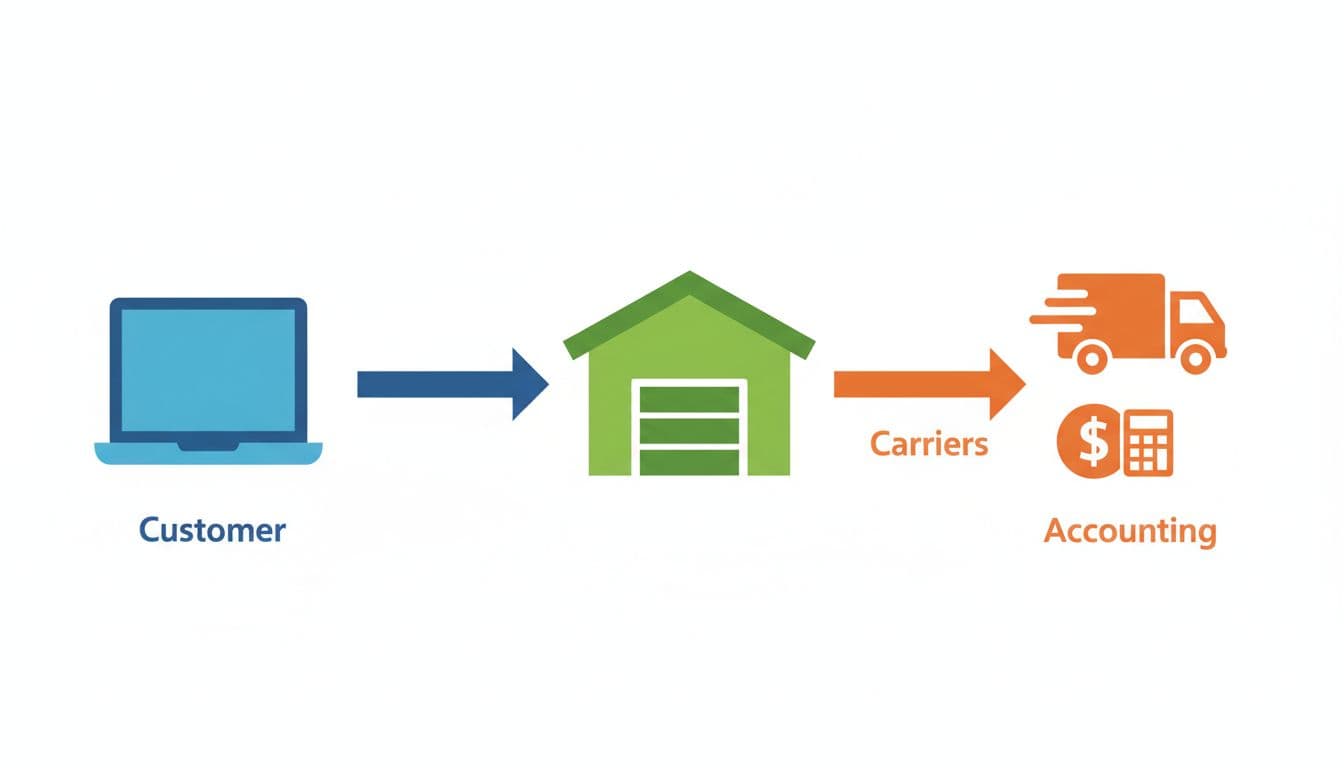
If you want that flow to stay clean, the WMS connection matters as much as the EDI feed itself. That’s why many 3PLs start by looking at key WMS connection types for 3PL operations, especially when they need customer orders, shipment updates, and invoices to stay in sync.
The business case for EDI in a growing 3PL warehouse
For a growing 3PL, EDI is not just a tech upgrade. It’s a way to protect margins, improve service, and make growth easier to manage. When orders rise and clients expect faster updates, manual handoffs start to crack.
The value shows up in daily work. You get fewer entry mistakes, faster onboarding for EDI-ready clients, better SLA performance, and billing that matches what actually happened on the floor. That also builds trust, because customers see cleaner data and fewer surprises.
How EDI reduces manual work without removing operational control
EDI does not put the warehouse on autopilot. Your team still needs receiving rules, pick workflows, shipment checks, and exception handling when data looks wrong. The difference is that staff spend less time retyping and more time managing real work.
Instead of copying order details from emails or portals, order data drops into the right workflow faster. That cuts copy-paste steps, lowers keying errors, and frees supervisors to focus on priorities like rush orders, stock issues, and client needs. In practice, EDI gives you better staff use, not less control.

Why better data flow leads to faster shipping and cleaner invoicing
Good shipping starts with good input. If inbound order data is accurate, your WMS can direct picking, packing, labels, shipment notices, and billing with fewer delays. When the first record is wrong, the error travels downstream like a bent rail on a train line.
That is why EDI often improves both speed and finance at the same time. Fewer bad addresses, missing SKUs, and duplicate orders mean less rework at the dock and fewer invoice disputes later. If you’re pairing EDI with Leanafy WMS with EDI capabilities, that cleaner handoff becomes easier to manage across warehouse and billing workflows.
When customer requirements make EDI a growth issue, not just an IT project
Many retailers, brands, and enterprise shippers expect EDI readiness before they move forward. In some cases, it is part of onboarding. In others, it becomes a hard requirement once volume grows.
So the business case is simple. EDI can help you win accounts, keep accounts, and onboard faster. It stops being an internal systems project and becomes a commercial capability. If your warehouse wants larger clients, stronger trust, and fewer operational fire drills, EDI starts to look less optional and more like table stakes.
What 3PLs need in place before they start with EDI
EDI works best when your warehouse is already speaking clearly to itself. If your data is messy, your workflow is half-documented, or nobody owns the handoffs, automation will only move bad information faster. A clean setup takes more effort up front, but it saves a lot of time once orders start flowing.
Start with clean customer, SKU, and address data
Messy master data breaks automation because EDI depends on exact matches. If one system says EA and another expects CASE, your order can fail before it reaches the floor. The same goes for bad item codes, duplicate SKUs, and outdated ship-to records.
Watch these trouble spots first:
- Item codes that don’t match between customer files and your WMS
- Units of measure that change by client, vendor, or channel
- Pack configurations like inner packs, cases, and pallets
- Ship-to data with missing suite numbers, bad postal codes, or old locations
- Charge rules that don’t reflect how you actually bill storage, picks, or special handling
Think of master data as the rails under the train. If the rails are bent, the process won’t stay on track.
Map your real warehouse workflow before you map any EDI document
Before you touch an 850, 940, or 945, write down how work moves today. Document how orders are received, released, fulfilled, confirmed, and billed. Then compare that flow to what your customer expects through EDI.

This is where hidden exceptions show up. For example, what happens if you only ship part of an order, hold a backorder, or find damaged goods during picking? If those cases are not planned before go-live, your team will end up fixing them by email.
The best EDI maps reflect the way your warehouse actually runs, not the way it looks in a sales deck.
Decide who owns setup, testing, and exception handling
Small team or large team, ownership matters more than headcount. Someone needs to own the data setup, someone needs to run testing, and someone needs to handle exceptions once live orders start moving.
In most 3PLs, the split looks something like this: operations owns process reality, customer success owns client coordination, IT owns system logic, and the EDI partner owns mapping and transport. Keep it simple, but make it clear.
Choose a WMS and integration setup that can support EDI growth
Your software foundation matters because EDI rarely stays small. One customer becomes three, one document becomes five, and soon you need barcode-driven workflows, real-time inventory visibility, and support for multiple clients with different rules.
That is why many teams look for a WMS with strong integration depth from day one. If your system can already support barcode scanning, client-specific logic, and Leanafy WMS integrations with EDI and ERP systems, adding new trading partners gets much easier later. A solid setup doesn’t just help you launch, it helps you scale without rebuilding everything.
A simple step-by-step plan to launch your first EDI customer
Your first EDI launch should feel controlled, not chaotic. The best approach is to keep the scope tight, test the messy real-life cases, and give your team a short window to build trust in the new flow.
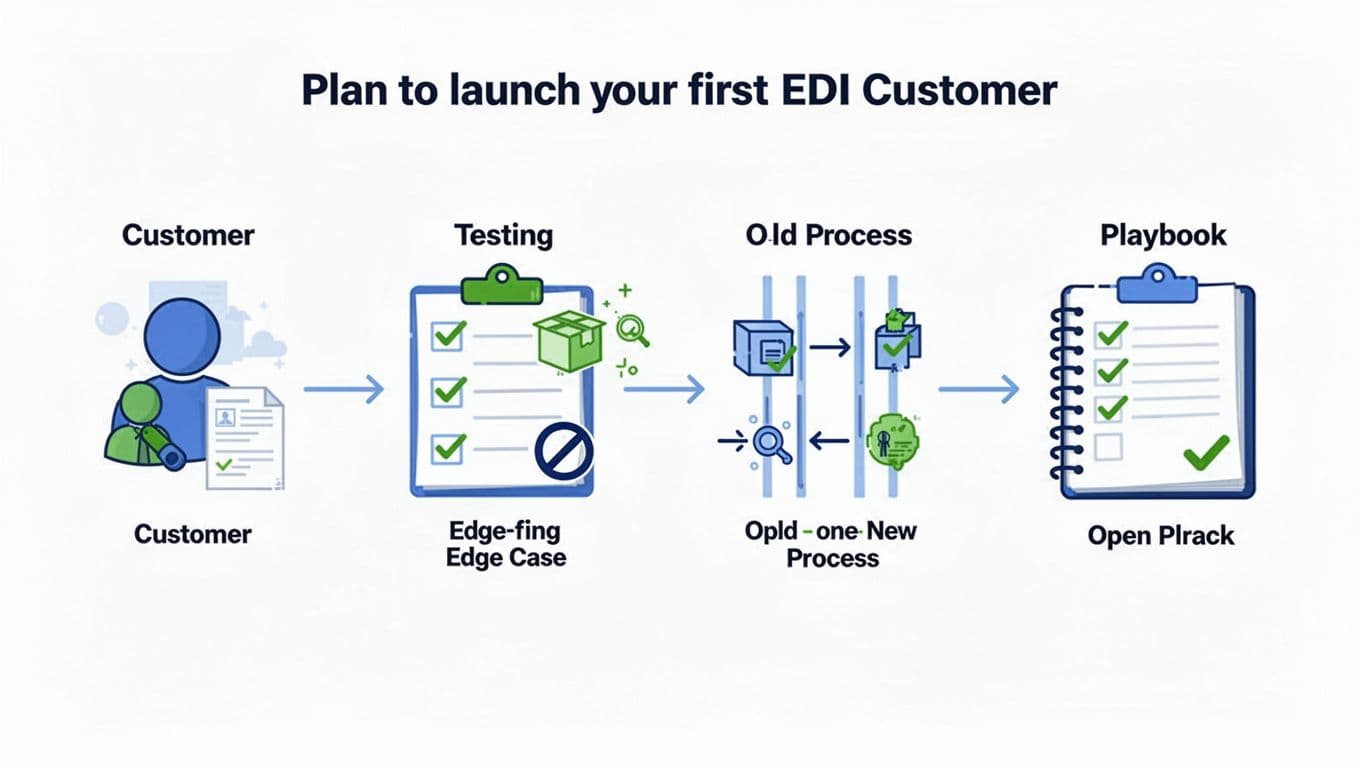
If you try to automate everything at once, you create too many moving parts. A better first win is simple: launch one customer, prove the process works, then turn that success into a repeatable model.
Pick one customer, a small document set, and one clear success goal
Start with one customer that has a steady order flow and a responsive team. Then limit the first phase to a small document set, such as outbound orders plus shipment confirmation. In many 3PL setups, that means getting orders in cleanly and sending shipment status back fast.
This is not the time to add every possible document, rule, and edge case. Keep the lane narrow so your team can see where issues come from and fix them quickly.
Set one or two success goals before testing starts. Good examples include:
- Higher order accuracy
- Less manual entry time
- Faster shipment confirmation
- Fewer email-based corrections
That gives everyone a clear target. It also makes the launch easier to judge. If the process saves time and reduces errors, it worked.
Test edge cases before you go live
Basic test orders rarely show the real problems. Trouble usually starts with exceptions, because warehouse work is full of them.
Run tests for the cases your team sees every week, including canceled orders, split shipments, substitutions, invalid addresses, short ships, and invoice mismatches. If your customer allows partial fulfillment, test that too. If they expect exact confirmation timing, check that as well.
A setup is only “ready” when it handles the ugly orders, not just the easy ones.
Keep this practical. Ask your team to walk through what they would do on the floor, in customer service, and in billing when something goes off script.
Run a short parallel period so your team can catch issues early
For a limited time, compare the EDI-driven transaction to the old process. Match the order details, shipment status, and billing outcome side by side. This helps you spot field mismatches, missing updates, or timing gaps before they become client-facing problems.
The key is to keep this period short and intentional. You are building confidence, not creating permanent double work. Once the new flow proves it can handle normal volume and common exceptions, move fully into the EDI process.
Review results, fix weak spots, then build a repeatable onboarding playbook
After go-live, review what worked and what slowed the team down. Maybe address validation needs tighter rules. Maybe shipment confirmations need clearer timing. Fix those weak spots while the launch is still fresh.
Then document the rollout so the next customer is easier. Your playbook should cover required fields, test cases, main contacts, timeline targets, approval steps, and escalation paths. If you’re building toward a stronger long-term setup, this is also where it helps to think about Leanafy 3PL software EDI integrations that can support future customer onboarding without starting from scratch each time.
One clean launch becomes your template. That is how EDI stops feeling like a one-off project and starts becoming a reliable warehouse capability.
Common EDI mistakes beginners make, and how to avoid them
Most EDI problems at the start are not caused by the format itself. They usually come from rushed setup, weak data rules, or trying to do too much too soon. The good news is that these mistakes are common, easy to spot, and fixable with a simpler rollout plan.
Treating EDI like a one-time tech install instead of an operating process
A lot of teams think go-live is the finish line. It isn’t. EDI needs daily attention, because orders fail, customer rules change, and small mapping issues can turn into missed shipments fast.

After launch, someone should own monitoring, exception handling, and partner follow-up. If an order fails, your team needs a clear path to catch it, fix it, and confirm the customer got the update. Think of EDI like a conveyor belt, not a light switch. Once it’s running, you still need people watching the flow.
Skipping data rules and then blaming the software
Software usually exposes bad process rules, it doesn’t create them. If SKUs don’t match, charges are vague, or customer requirements live in email threads, EDI will move that confusion faster.
The biggest trouble spots are often simple:
- Bad item data, like mismatched SKUs or units of measure
- Weak billing logic, like unclear storage or accessorial charges
- Unclear customer rules, like partial shipment or routing expectations
Clean data beats fancy software every time.
The fix is basic but powerful: lock down master data, document billing logic, and confirm customer-specific rules before testing.
Trying to automate everything at once
This mistake creates delays, extra cost, and a stressed-out team. Start with one partner, a few document types, and one clear goal. Then expand in stages once the first flow works.
A small win builds trust. In other words, you don’t need a perfect EDI program on day one. You need a stable first version, then steady improvement.
Conclusion
EDI doesn’t have to feel hard for a 3PL warehouse. When you start with clean data, a clear process, and the right system support, EDI becomes a practical way to reduce manual work, improve accuracy, and keep customer communication on track.
The best first step is usually a small one. Pick one customer, focus on a few core documents, test real exceptions, and build from there. As a result, your team learns the process without adding chaos to the floor.
Just as important, your first launch should set the pattern for the next one. With the right foundation, each new trading partner gets easier to onboard, and service gets more consistent as volume grows. If you’re planning for that next stage, a cloud-based WMS for 3PL providers can help support the kind of connected workflows EDI needs.
Start simple, stay consistent, and treat the first EDI customer as the base for stronger operations ahead.